OpenAI dropped ChatGPT Images 2.6 (also called GPT-Image-2.6 in the API) a few days ago. The official claims are straightforward: generation is about 50% faster than the previous version, it can output native looping GIFs from a prompt or a still image, and you can save reference images of a person, pet, product, or character so later edits keep them consistent. Playback speed on those GIFs can be adjusted from 0.5x to 2x, and you can edit frame by frame.
I am not an AI artist or a prompt engineer. I am an operations coordinator who already uses ChatGPT for emails, meeting notes, and the occasional family schedule. Image generation has mostly been a side experiment for me—quick product mockups for internal slides, a simple illustration for a school project with the kids, or a visual that makes a status update less boring. So when the update landed, I ran the same kind of tests I do with any new ChatGPT feature: start with something concrete, push it until it breaks or surprises me, note the time and the edits required, and decide whether it survives a real Monday.
Here is what held up, what still needs a human eye, and where it actually saves time for ordinary office and home use.
Native GIF Generation: From Still Chicken to Moving Mascot
The headline feature is native GIF output. You type a prompt or upload a still and ask for a looping animation. No separate tool, no exporting frames and stitching them yourself.
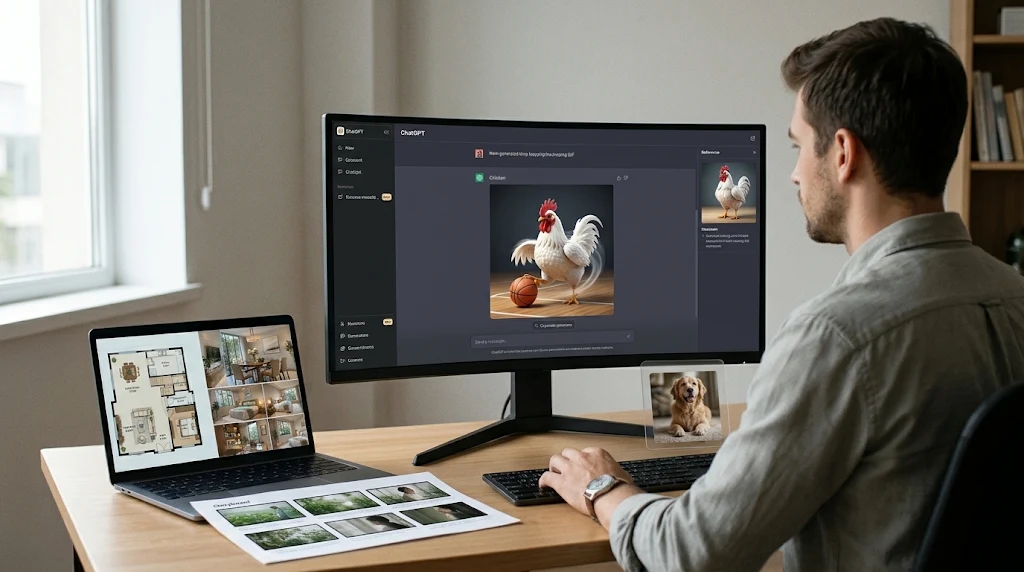
I started with one of the official demo GIFs OpenAI released—a white-feathered chicken—and asked for a version where the chicken plays basketball. The first result was stiff. The second improved the motion. The third added more complex body mechanics and looked usable. That iteration loop took under a couple of minutes once the model was warmed up.
I then tried different visual styles on similar subjects: cyberpunk, cartoon, soft dreamy lighting, photorealistic latte-art style, and simple sticker/emoji. The sticker and emoji results were the most immediately useful. If you need a quick reaction image for Slack, a team channel, or a parent group chat, you can generate a clean looping sticker in tens of seconds and adjust the speed on the spot. For internal presentations or light social posts, that removes a whole trip to a separate GIF maker.
Practical limit: the motion still benefits from clear direction. Vague prompts (“make it fun”) produce average results. Specific action plus style (“the chicken dribbles twice, then jumps for a layup, simple cartoon style, seamless loop”) works better. And as with any generative output, check for odd artifacts in the loop before you send it to a client or the school group.
Interior Design Tests: Rough Photos and Floor Plans
Next I tested something closer to real work and home projects. I uploaded a photo of an unfinished (roughcast) apartment and asked for ten different finished styles. The model returned a set in roughly a minute and a half: minimalist, heavily furnished, luxury, Chinese-inspired, and a few more distinctive looks. Separate runs for French-style and Nordic-style variants also looked coherent and relatively realistic.
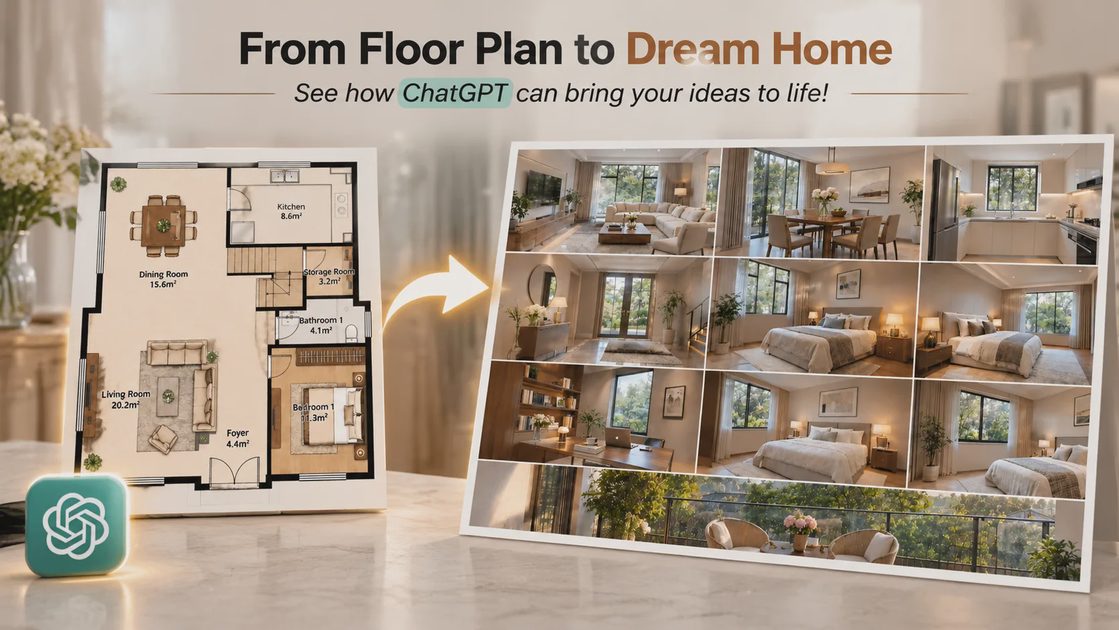
More interesting was the floor-plan test. Upload a simple interior layout (living room, dining, bedrooms, even a second floor) and ask for photorealistic views of the spaces. The results were good enough to use as conversation starters with a spouse, a contractor, or a client who needs to visualize options before spending money. Lighting, furniture scale, and material suggestions held together better than earlier image models I had tried.
For an operations person or a parent planning a renovation, this is useful as a fast idea generator, not as a final architectural rendering. Always treat the output as a discussion aid. Measure the real room, check load-bearing walls, and verify materials with a professional. The model does not know your local building codes or your actual budget.
Chinese Calligraphy and Physical Understanding
I also ran language and physical-reasoning checks. For calligraphy I requested Su Shi’s Nian Nu Jiao: Reminiscence of the Red Cliffs in running script, then compared other styles: semi-cursive, cursive, wild cursive, Yan-style regular script, and golden-needle script. The golden-needle version was particularly clean. The model now handles different Chinese script styles more convincingly than earlier versions, though it still mixed traditional and simplified characters in places. If you need accurate calligraphy for a formal use, have a native reader or calligrapher review it.
For physical understanding I asked for complete step-by-step illustrated instructions for folding a paper airplane, a paper boat, and a paper crane—one clear illustration per step. The boat and crane sequences were solid. The model appears to have a better internal sense of sequential physical actions than previous releases. That matters if you ever need quick visual how-tos for a kid’s craft project or a simple desk demonstration.
Product Photography and Multi-Turn Consistency
Consistency across edits is where Images 2.6 feels like a real step forward for practical work. I generated a matte-black bottle, then iterated: place it on a marble step with realistic lighting and shadow, switch to dramatic side lighting to show surface texture, change background, adjust camera angle. Across those turns the bottle’s shape, label placement, and material details stayed essentially unchanged. Earlier models often drifted on small product details after two or three edits. That reliability is useful when you are preparing a product sheet, a catalog mockup, or a simple internal slide and do not want to re-describe the object every time.
Reference-image support reinforces this. Save a clear photo of a person, pet, product, or character once. Later prompts can reuse it without re-uploading, and the model keeps identity and key details more stable. For anyone who repeatedly needs the same brand mascot, team member illustration, or family pet in different scenes, this removes a lot of friction.
Storyboards, UI Mockups, and Downstream Video
I tested storyboard-style generation with lines from a classic Chinese poem (Li Qingzhao), asking for sequential cinematic frames that matched the imagery: swing after movement with fallen petals, plants heavy with dew, a startled look over the shoulder. Composition and lighting were strong. Those frames can feed a separate video-generation model if you want a short moving piece. The same approach works for simple costume-drama style shots or UI prototypes—iPhone screens, macOS windows—with coherent color and lighting.
Again, the practical use is upstream of final production. Generate the key frames, pick the best ones, then hand them to a video tool or a designer. Do not treat the storyboard as the finished short.
What I Actually Use It For Now
After the tests, a few workflows survived the “would I still do this next Monday” filter:
Quick looping stickers or reaction GIFs for internal Slack or family group chats.
Visual options for a home renovation discussion or a simple product mockup before involving a designer.
Consistent product shots across a few lighting and background variations without the object changing.
Rough storyboard frames when I need to explain a sequence to a colleague or the kids.
Clean illustrated steps for a short physical task (origami, basic setup) when a text list is not enough.
Speed helps. The claimed 50% improvement is noticeable in multi-turn sessions. Consistency across edits is the bigger practical win for anyone who iterates rather than one-shots.
Limits That Still Matter
The model is better, not perfect. Chinese characters can still mix traditional and simplified forms. Complex multi-object scenes or fine text can introduce artifacts. Motion in GIFs benefits from precise prompts. Physical reasoning is improved but not infallible—always verify steps that involve safety or exact measurements. And any image that will be used externally (client work, school materials, public posts) still needs a human review for accuracy, bias, and brand fit.
Privacy remains the same rule I use everywhere: never upload photos that contain confidential work data, other people’s faces without consent, or private family details you would not want stored. Strip EXIF data if it matters. Treat the reference-image library carefully.
Bottom Line from the Desk
ChatGPT Images 2.6 is a clear upgrade for the kinds of visual tasks an ordinary office worker or parent actually runs into. Native GIFs remove a tool hop. Reference images and stronger edit consistency make multi-turn product or character work less frustrating. Floor-plan and interior visualization speed up early-stage conversations. The calligraphy and step-by-step physical tests show broader improvements in understanding.
Useful beats impressive. This version is more useful. I will keep using it for the short list of jobs above and keep testing the edges when new needs appear. If it saves ten or fifteen minutes on a mockup or a family craft illustration, that is enough reason to keep it in the toolkit.
No magic. Just a faster, more consistent image tool that survived a few real tests at the desk.